

Expert Clipping Path Services for Stunning Images

At Apt Clipping, we understand the importance of high-quality images in e-commerce, advertising, and other industries. Our expert team provides professional clipping path services to help you achieve visually stunning images that drive sales and engagement.

what is clipping path service?

Types of Photoshop Clipping Paths 

In the realm of digital imagery, seasoned professionals—including renowned photographers, astute studio managers, and skilled graphic designers—recognise the inherent diversity in image composition and complexity. This variation is not merely aesthetic; it fundamentally influences the intricacy of clipping path services required and, consequently, the associated costs. At aptclipping, we have established a rigorous pricing framework that aligns with industry standards, ensuring our clients receive exceptional quality while benefiting from fair and transparent pricing structures.

What is a Basic Clipping Path?

A Basic Clipping Path, also known as a Simple Clipping Path, is a fundamental technique in digital image editing. It involves creating a closed vector path or shape to cut out a 2D image from its background. This method is primarily used for images with subjects that have clear, defined edges and minimal intricate details.

Key Characteristics of Basic Clipping Paths:

  1. Simple Shapes: Ideal for objects with straightforward outlines like furniture, electronics, or basic geometric shapes.
  2. Clear Edges: The subject should have distinct boundaries separating it from the background.
  3. Minimal Curves: While some gentle curves are acceptable, complex or numerous curves may require more advanced techniques.
  4. Single-Layer Objects: Typically used for isolating a single object or group of objects treated as one unit.

Applications of Basic Clipping Paths:

  • E-commerce Product Images: Isolating products for consistent, clean product listings.
  • Catalog Creation: Preparing images for print or digital catalogs.
  • Background Removal: Replacing or removing backgrounds for versatile image use.
  • Photo Compositing: Combining elements from different images into a single composition.

The Process:

  1. Selection: Using the Pen Tool in software like Adobe Photoshop to carefully trace around the subject.
  2. Path Creation: Converting the selection into a closed path.
  3. Refinement: Adjusting anchor points and handles for precision.
  4. Application: Applying the path to create a cut-out or mask.

Benefits:

  • Clean Edges: Results in sharp, professional-looking cut-outs.
  • Flexibility: Allows for easy background changes or image placement.
  • Efficiency: Quicker to create compared to more complex paths.
  • Consistency: Ensures uniform look across product lines or image series.

When to Use Basic Clipping Paths:

Basic Clipping Paths are ideal for projects that require quick turnaround and involve straightforward subjects. They’re cost-effective for large batches of similar products and serve as the foundation for more advanced image editing techniques.

Understanding when to use Basic Clipping Paths versus more complex methods is crucial for efficient workflow and optimal results in professional image editing.

What is a Compound Clipping Path?

A Compound Clipping Path is an advanced image editing technique that involves creating multiple paths within a single image to isolate complex objects or groups of objects. This method is used when a basic clipping path is insufficient due to the intricacy of the subject matter.

Key Characteristics of Compound Clipping Paths:

  1. Multiple Paths: Involves creating two or more separate paths within the same image.
  2. Complex Objects: Ideal for subjects with intricate details, holes, or transparent areas.
  3. Layered Elements: Used for images with overlapping objects or objects within objects.
  4. Varied Edges: Can handle both sharp and soft edges within the same image.

Applications of Compound Clipping Paths:

  • Product Photography: Isolating complex products with multiple components.
  • Fashion and Jewelry: Dealing with intricate designs and transparent elements.
  • Automotive Photography: Handling vehicles with windows, grilles, and complex shapes.
  • Architectural Images: Isolating buildings with detailed features like windows and doors.

The Process:

  1. Primary Path Creation: Establishing the main outline of the object.
  2. Secondary Paths: Creating additional paths for internal details or separate elements.
  3. Path Hierarchy: Organizing paths to define which areas are cut out and which remain.
  4. Refinement: Adjusting anchor points and handles for precision on all paths.
  5. Compilation: Combining all paths into a single compound path.

Benefits:

  • Precision: Allows for accurate isolation of complex subjects.
  • Versatility: Enables handling of diverse image elements within a single edit.
  • Quality Retention: Maintains image integrity even with intricate details.
  • Advanced Editing Potential: Facilitates more complex photo manipulations and compositions.

When to Use Compound Clipping Paths:

Compound Clipping Paths are essential when dealing with:

  • Objects with holes or transparent areas (e.g., a bicycle wheel)
  • Products with multiple distinct parts (e.g., a watch with its strap and face)
  • Images requiring selective background removal
  • Subjects with both solid and translucent areas

Comparison with Basic Clipping Path:

While a Basic Clipping Path is suitable for simple objects with clear outlines, Compound Clipping Paths are necessary for:

  • More time-intensive and complex editing tasks
  • Higher-value products requiring detailed presentation
  • Images where preserving intricate details is crucial


What is an Alpha Channel Clipping Path?

An Alpha Channel Clipping Path is a method of isolating or selecting parts of an image based on transparency information stored in an alpha channel. This technique is particularly useful for complex images with varying degrees of transparency or soft, feathered edges.

Key Features:

  • Ideal for subjects with fuzzy edges (e.g., hair, fur, smoke)
  • Allows for partial transparency
  • Can be created from existing selections or painted manually

Process:

  1. Create or load a selection in Photoshop
  2. Convert the selection to an alpha channel
  3. Refine the alpha channel using painting tools or adjustments
  4. Use the alpha channel to create a mask or selection for clipping

Benefits:

  • Preserves subtle transparency details
  • Allows for smooth transitions between the subject and background
  • Offers more flexibility than traditional vector-based clipping paths

What is a Vector Mask Clipping Path?

A Vector Mask Clipping Path uses vector shapes to define the visible areas of a layer. It combines the precision of vector paths with the non-destructive nature of layer masks.

Key Features:

  • Creates sharp, precise edges
  • Easily editable and scalable without quality loss
  • Non-destructive editing technique

Process:

  1. Create a vector shape or path around the desired area
  2. Apply the vector mask to the layer
  3. Refine the mask using vector editing tools

Benefits:

  • Perfect for objects with crisp, defined edges
  • Allows for easy resizing without loss of quality
  • Provides flexibility to edit the mask at any time

What is a Layer Mask Clipping Path?

A Layer Mask Clipping Path is a grayscale image attached to a layer that controls the layer’s visibility. It allows for soft edges and partial transparency, making it versatile for various clipping needs.

Key Features:

  • Supports both hard and soft edges
  • Allows for partial transparency
  • Can be edited with painting tools and filters

Process:

  1. Add a layer mask to the desired layer
  2. Use brushes or selection tools to define the visible areas
  3. Refine the mask using adjustment tools or filters

Benefits:

  • Highly flexible and easily editable
  • Suitable for both precise and soft-edged selections
  • Allows for complex clipping effects like gradual fading

Comparison Table

TechniqueBest ForEdge QualityTransparency HandlingEditabilityComplexityProcessing Time
Basic Clipping PathSimple shapes, clear edgesSharpLimitedModerateLowQuick
Compound Clipping PathComplex objects, multiple partsSharpModerateHighHighTime-consuming
Alpha ChannelSoft edges, complex transparenciesSoft, detailedExcellentModerateModerateModerate
Vector MaskScalable graphics, logosVery sharpLimitedHighLow to ModerateQuick
Layer MaskGeneral-purpose, blend of edgesFlexibleExcellentHighLow to HighVariable

Choosing the Right Technique

Basic Clipping Path

  • Best for: Simple product photography, basic shape isolation
  • When to use:
    • Objects with clear, defined edges
    • Quick turnaround needed
    • Batch processing of similar simple shapes

Compound Clipping Path

  • Best for: Complex products, multiple object isolation
  • When to use:
    • Objects with internal holes or transparent areas
    • Products with multiple distinct parts
    • High-end product photography requiring precise detailing

Alpha Channel Clipping Path

  • Best for: Images with fuzzy edges or varying transparency
  • When to use:
    • Subjects with hair, fur, or feathers
    • Smoke, clouds, or other translucent elements
    • Need for preserving partial transparency

Vector Mask Clipping Path

  • Best for: Graphics that require scalability
  • When to use:
    • Logo design and isolation
    • Text effects
    • Any image that may need resizing without quality loss

Layer Mask Clipping Path

  • Best for: Versatile editing and non-destructive workflows
  • When to use:
    • General photo editing tasks
    • Blending multiple images
    • Situations requiring frequent adjustments or experimentation

Factors to Consider When Choosing a Technique

  1. Subject Complexity: Assess the intricacy of the object or image you’re working with.
  2. Edge Type: Determine if you need sharp, soft, or variable edges.
  3. Transparency Requirements: Consider whether you need to handle partial transparency.
  4. Editability Needs: Think about how much you might need to adjust the clipping path later.
  5. Time Constraints: Factor in your deadline and the processing time each technique requires.
  6. Intended Use: Consider where and how the final image will be used (print, web, etc.).
  7. Skill Level: Be honest about your proficiency with each technique.

Best Practices

  • Start with the simplest technique that can achieve your desired result.
  • For complex projects, don’t hesitate to combine techniques for optimal results.
  • Always create on a separate layer or use non-destructive methods to preserve the original image.
  • Save your work at various stages to allow for easy revisions.
  • When in doubt, opt for techniques that offer more flexibility (like Layer Masks) to allow for future adjustments.

By understanding the strengths and ideal use cases for each clipping technique, you can choose the most effective method for your specific project, ensuring high-quality results and efficient workflows.

Have any question

Frequently Asked Questions

Better Research, Better Design, Better Results
Sed ut perspiciatis unde omnis iste natus error voluptatem accusantium dolore mque laudantium totam rem aperiam, eaque ipsa quae ab illo inventore veritatis et quasi architecto beatae vitae dicta sunt explicabo.

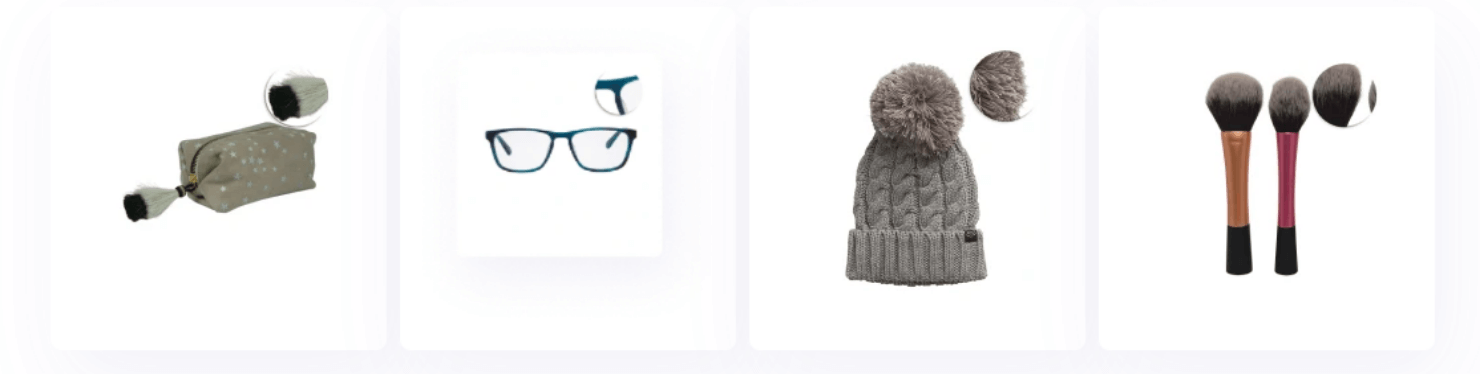
Great for:

Eyeglasses
Handbags, clutches, and jewelry with tassels
Clothing with a fringed hem
What is a clipping path, and how is it used in image editing?

A clipping path is a vector path or outline used to separate an object from its background in an image. By defining the edges of an object, a clipping path allows for precise editing and manipulation, such as removing or changing the background, isolating the object for further editing, or placing the object in a new context. This technique is commonly used in product photography, e-commerce, and advertising to enhance visual appeal and ensure the subject stands out.

What types of images are suitable for clipping path services?

Clipping path services are versatile and can be applied to various types of images, including product photos, portraits, illustrations, and more. The technique is particularly effective for images with clear, well-defined edges and simple backgrounds. However, for complex images with intricate details or overlapping elements, advanced techniques may be required to ensure a clean and accurate result.

How long does it take to complete a clipping path project?

The turnaround time for a clipping path project depends on several factors, including the complexity of the image, the number of images, and the level of detail required. Simple images with straightforward edges may be processed within a few hours, while more intricate images or larger volumes may take longer. Typically, service providers offer standard delivery times and expedited options to accommodate different needs.

What file formats do you accept for clipping path services?

Most clipping path services accept a variety of file formats, including JPEG, PNG, TIFF, PSD, and AI. It's important to provide high-resolution images to ensure the best results. If you have specific requirements or file format preferences, it's advisable to communicate these with the service provider to ensure compatibility and quality.

How much does clipping path service cost, and what factors influence the price?

The cost of clipping path services varies based on factors such as the complexity of the image, the number of images, and the level of detail required. Basic clipping paths for simple images are typically more affordable, while intricate paths involving detailed work may incur higher fees. Service providers often offer pricing based on per-image rates or bulk packages. For an accurate quote, it's best to discuss your specific project requirements with the provider.

How it works

How Cliper works

01 . Submit Your Order

Upload your images and specify your requirements through our user-friendly interface.

02 . Receive a Swift Quote

Get a detailed, competitive quote within 30 minutes of your submission.

03 . Approve and Initiate

Review the quote, make any adjustments, and give us the green light to start editing.

04 . Expert Editing

Our skilled team meticulously enhances your images using advanced Photoshop techniques.

05 . Quality Check and Delivery

Download your perfectly edited images, typically within 24 hours of approval.

06 . Secure Payment

Pay only when you're 100% satisfied with the results. We offer multiple payment options.

Clients Feedback

Explore What Our Clients Say